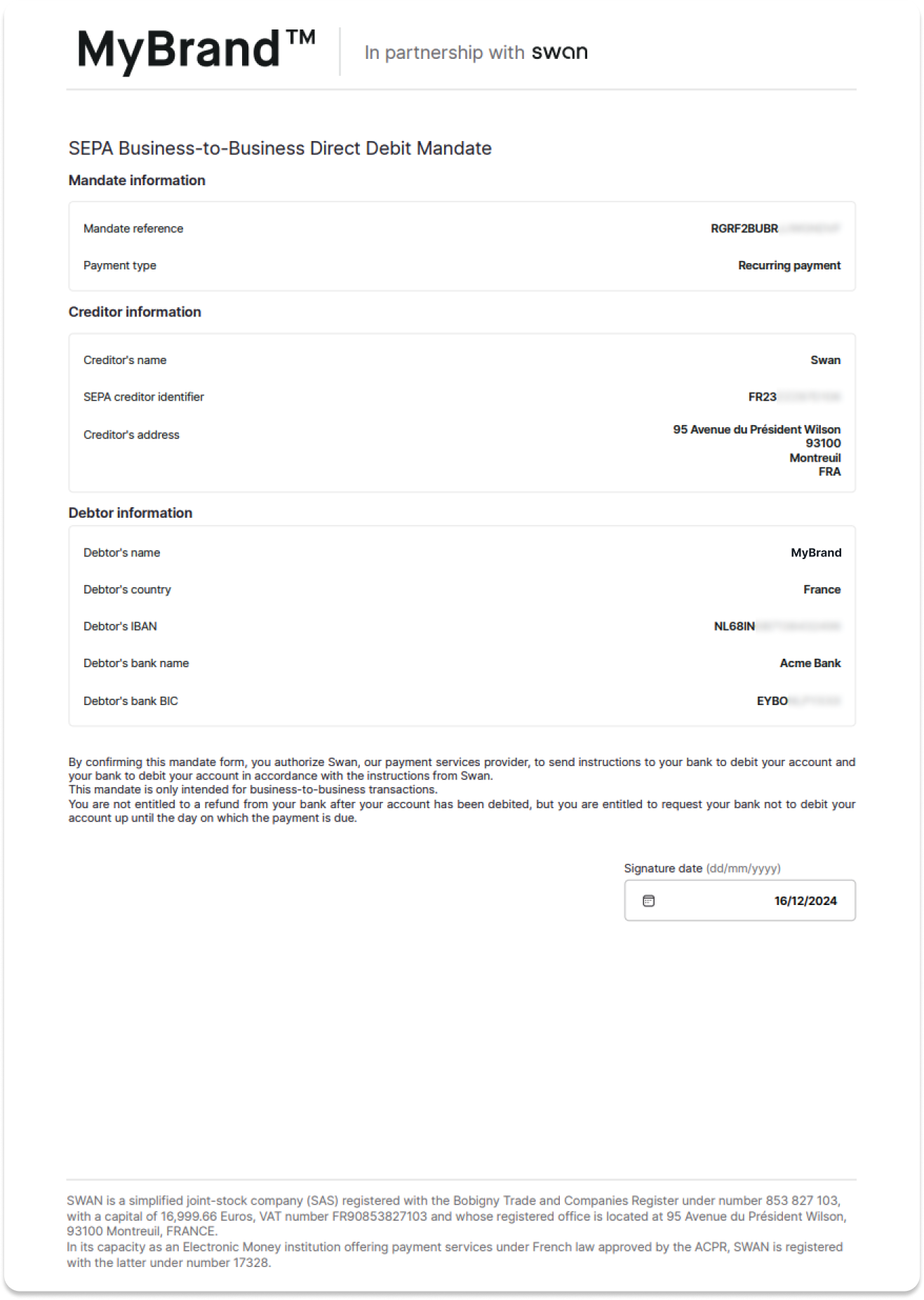
Add a SEPA Direct Debit B2B funding source
Add a SEPA Direct Debit B2B funding source with the API.
Prerequisites
- The user adding the funding source is either an account member with the
canManageAccountMembershipandcanViewAccountpermissions, or the account holder. - The funding source is a non-Swan account that is accessible to the Swan account holder or eligible account member.
- Call the mutation with a user access token associated with the account holder or eligible account member. They need to sign the direct debit mandate by consenting to the sensitive operation of adding a funding source.
Step 1: Add the funding source
- Call the
addDirectDebitFundingSourcemutation. - Choose the
SepaDirectDebitB2bscheme.- Though
Coreis an option in the API, it's not actually available for account funding.
- Though
- Add your
accountId,iban,consentRedirectUrl, and anamefor your funding source (nameis primarily for your reference). - Add the success payload:
AddDirectDebitFundingSourceSuccessPayload. - Add the consent URL to the success payload:
fundingSource>DirectDebitFundingSource>paymentMandate>SEPAPaymentDirectDebitMandate>statusInfo>PaymentMandateConsentPendingStatusInfo>consent>consentUrl. - Add rejections (not shown).
🔎 Open the mutation in API Explorer
mutation AddSddB2b {
  addDirectDebitFundingSource(
    input: {
      scheme: SepaDirectDebitB2b
      accountId: "$YOUR_ACCOUNT_ID"
      iban: "$YOUR_IBAN"
      consentRedirectUrl: "$YOUR_REDIRECT_URL"
      name: "Your funding source name"
    }
  ) {
    ... on AddDirectDebitFundingSourceSuccessPayload {
      __typename
      fundingSource {
        ... on DirectDebitFundingSource {
          id
          name
          paymentMandate {
            ... on SEPAPaymentDirectDebitMandate {
              id
              name
              signatureDate
              statusInfo {
                ... on PaymentMandateConsentPendingStatusInfo {
                  __typename
                  consent {
                    consentUrl
                  }
                }
              }
            }
          }
        }
      }
    }
  }
}
Step 2: Consent to adding the funding source
- Send the
consentUrl(line 14) to your Swan account member. - Instruct them to consent to adding the funding source.
Note that you also receive a funding source ID (line 6) and a payment mandate ID (line 9).
{
  "data": {
    "addDirectDebitFundingSource": {
      "__typename": "AddDirectDebitFundingSourceSuccessPayload",
      "fundingSource": {
        "id": "$YOUR_FUNDING_SOURCE_ID",
        "name": "Your funding source name",
        "paymentMandate": {
          "id": "$YOUR_PAYMENT_MANDATE_ID",
          "name": null,
          "statusInfo": {
            "__typename": "PaymentMandateConsentPendingStatusInfo",
            "consent": {
              "consentUrl": "https://identity.swan.io/consent?consentId=$CONSENT_ID&env=Sandbox"
            }
          },
          "mandateDocumentUrl": ""
        }
      }
    }
  }
}
Funding source and mandate
EnabledAfter the account holder consents to adding the funding source, the statuses for both the funding source and the direct debit mandate change to Enabled, and funds can be pulled into the Swan account.
However, the account holder still needs to declare their payment mandate to their external provider.
Step 3: Get the payment mandate
Get the mandateDocumentUrl to download the payment mandate.
- Call the
fundingSourcequery. - Add the funding source ID (provided in the step 2 payload, line 6)
- Add the
mandateDocumentUrlto the payload (line 10).
🔎 Open the query in API Explorer
query GetMandateUrl {
  fundingSource(id: "$YOUR_FUNDING_SOURCE_ID") {
    ... on DirectDebitFundingSource {
      id
      name
      paymentMandate {
        ... on SEPAPaymentDirectDebitMandate {
          id
          name
          mandateDocumentUrl
        }
      }
    }
  }
}
Step 4: Declare the mandate to the external account provider
The account holder must declare the payment mandate to the provider of their non-Swan account.
- Open the
mandateDocumentUrlprovided in the payload (line 9), which automatically triggers the download of the SEPA Direct Debit payment mandate PDF document. - Provide the payment mandate document to the account holder.
- Instruct the account holder to declare the payment mandate to the provider of their non-Swan account.
{
  "data": {
    "fundingSource": {
      "id": "$YOUR_FUNDING_SOURCE_ID",
      "name": "Your funding source name",
      "paymentMandate": {
        "id": "$YOUR_PAYMENT_MANDATE_ID",
        "name": "Your mandate name",
        "mandateDocumentUrl": "https://mandate.swan.io/$YOUR_FUNDING_SOURCE_ID/SANDBOX/FR23ZZZ87D106/UkdSRjJCVUJSSkpXR05EVkY=.pdf?Expires=1734430612&Signature=$SIGNATURE"
      }
    }
  }
}